AnswersQ
Find Your Best Learning Platform
4 quick questions — personalised in under 60 seconds
4 quick questions — personalised in under 60 seconds


I went deep inside Udacity — testing Nanodegrees, submitting projects for mentor review, and pulling apart hundreds of real user experiences — so you know exactly what you’re getting before you spend $249 a month.

You’ve been thinking about breaking into tech — AI, data science, cloud computing, maybe something cutting-edge like autonomous systems. You’ve heard the name Udacity. You’ve seen the $249/month price tag. And now you’re wondering: is this the real deal, or am I about to spend a lot of money on something I could get cheaper somewhere else?
I tested Udacity the way you’d want someone to — I went through actual Nanodegree content, submitted a project for mentor review, poked at the AI chatbot, and spent real time inside the platform’s interface. I also dug through hundreds of G2 ratings, Trustpilot reviews, BBB complaints, and learner community discussions to give you the unfiltered picture.
Here’s everything you need to make a smart decision — the good, the frustrating, and what’s actually changed since Accenture acquired Udacity in May 2024. If you want to see how Udacity stacks up against rivals, AnswersQ’s platform comparison tool does that in under 60 seconds.
Udacity is a tech-focused online learning platform best known for its Nanodegree programs — structured, project-based courses built with Google, AWS, and Microsoft. It costs $249/month or $846 for 4 months, with 200+ free courses available at no cost. The standout feature is human project review: real mentors give detailed written feedback on your submitted work, usually within 24 hours. Since Accenture’s acquisition in May 2024, the platform is growing its enterprise footprint and launched an accredited MS in AI with Woolf University in October 2025. Overall rating: 4.4/5 — best for serious tech career learners, not ideal for casual or budget learners.
Yes — Udacity is a reliable, well-established platform with a track record going back to 2011. It was founded at Stanford by Sebastian Thrun and has served more than 21 million registered learners across 195 countries. Its curricula are built in partnership with companies like Google, Amazon, Microsoft, AWS, and Intel — not scraped together by anonymous content creators.
The most important update for anyone researching Udacity right now: Accenture acquired the platform in May 2024 and integrated it into its LearnVantage corporate training ecosystem. This is a significant credibility signal — one of the world’s largest consulting firms now backs the platform. In October 2025, Udacity launched an accredited Master of Science in Artificial Intelligence with Woolf University for under $5,000 total, a major move toward formal recognition.
The Nanodegree certificates are not traditionally accredited (except the new MS in AI), but they carry genuine weight in the tech industry — particularly when paired with the portfolio projects you build during the program. Many learners find the project work more valuable on a CV than the certificate itself.
With 200+ Nanodegree programs, 350+ courses, and 2,500+ skills covered, Udacity has built a genuinely substantial catalog — and it’s focused entirely on tech and adjacent fields. Its tagline “Bootcamp level quality, on your own time, at a fraction of the cost” captures the pitch well. The 8 core subject areas are AI & Machine Learning, Data Science, Cloud Computing, Programming & Development, Cybersecurity, Business & Leadership, Product Management, and Autonomous Systems.

Courses can be filtered by level — beginner, intermediate, or advanced — so the platform works regardless of where you’re starting from. But the detail that sets Udacity apart from most Udacity competitors is the content type split: Discovery courses ease complete non-technical learners into tech concepts without jargon overload, and Fluency courses give non-coders enough understanding to collaborate confidently with technical teams. That second category is surprisingly useful for managers, product people, and business analysts who don’t need to code but need to stop nodding blankly in engineering meetings.
There are also 200+ genuinely free courses — not demos or teasers — that you can access without paying anything. The quality holds up. They’re introductory in depth, but they’re real courses, not marketing funnels.
The content is where Udacity earns its premium price — and where it occasionally falls short. The strong programs are genuinely strong: industry-relevant, hands-on, built around real tasks rather than abstract exercises. When I went through modules in the AI and Data Science tracks, the progression felt logical and the projects were the kind of thing you’d actually put in a portfolio.
The instructors are a real differentiator. They’re not academics who’ve never shipped a product — they’re subject matter experts from companies like Google, AWS, and Meta who teach the way they actually work. The feedback I got on a submitted project went four pages deep, calling out specific issues, explaining the reasoning behind each fix, and suggesting approaches I hadn’t considered. That level of response is what you’d pay a private tutor hundreds of dollars per session to get.
Udacity also added an OpenAI-powered AI chatbot inside the learning platform. I tested it mid-lesson for conceptual questions — it handled vocabulary, clarifications, and “why does this work this way” questions well. It doesn’t replace the human mentor for project feedback, but it meaningfully reduces the waiting-stuck-on-a-concept problem. Combined with video lessons, quizzes, and a built-in coding editor, the learning environment is genuinely engaging rather than passive.
Want to see how Udacity’s content depth compares to Coursera, edX, and LinkedIn Learning side by side?
Compare All Platforms Free →Udacity’s web platform runs cleanly on Windows, Mac, and Linux. The responsive design means you can browse and watch content on mobile without major issues — but the experience you want is on a laptop or desktop. The integrated coding environment, project submission flow, and detailed code review outputs are all significantly better with a proper keyboard and screen in front of you. Udacity no longer offers a dedicated Android or iOS app, which is a genuine gap compared to Coursera and Udemy.

The dashboard itself is clean and well-organised — your active programs, upcoming deadlines, and project status are easy to find at a glance. The search and filter system works well when you’re exploring the catalog.

The video player is smooth, the coding editor loads without friction, and I didn’t encounter meaningful lag during testing. The UI isn’t the most visually exciting thing in the world, but it gets out of the way and lets you focus on learning — which is what you actually want from a study environment.
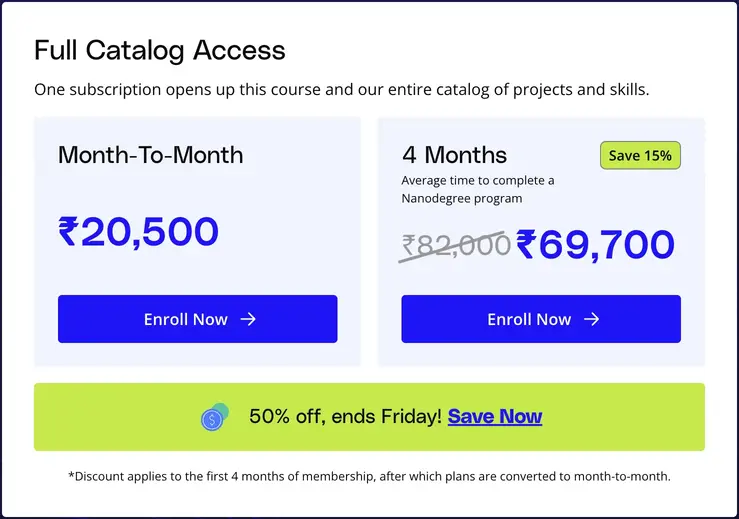
The price is the thing everyone reacts to first — and fairly so. The monthly All Access plan costs $249, and the 4-month bundle comes in at $846, which saves you 15% and works out to around $211/month. Both give you identical access to the full catalog: all Nanodegrees, all projects, all mentor feedback, and a verified certificate on completion.
| Plan | Price | What’s Included |
|---|---|---|
| Free Courses | $0 | 200+ intro courses — no projects, no certificate |
| Monthly All Access | $249 / month | Full catalog, projects, human mentor feedback, certificate |
| 4-Month Bundle | $846 total (saves 15%) | Same as monthly — best value for one complete Nanodegree |
| Single Nanodegree | Varies by program | One program, lifetime access — select programs only |
| Teams / Enterprise | Custom pricing | Group access, analytics, team management — 5+ people |
| MS in AI (Woolf Univ.) | Under $5,000 total | Fully accredited master’s degree — launched October 2025 |
Udacity also lets you pause your subscription for 1–3 months without canceling. You lose access to content during the pause but keep your progress intact. That’s a genuinely useful safety valve for anyone juggling a busy work period.
A 7-day free trial exists, but only for learners in Australia, Brazil, Canada, Germany, Italy, Spain, Turkey, and the UK. A $10 pre-authorization hold applies — it drops automatically if you cancel in time. For everyone else, the 200+ free courses are the best way to test the platform before committing.
You get a full refund within 7 days of your very first subscription purchase. After that, there are no refunds for any subsequent renewals or mid-period cancellations. Several complaints I found on the BBB came from learners who discovered content problems after the 7-day window had already closed — so treat that first week as a genuine evaluation period, not a grace period you can ignore.
Perfection doesn’t exist in online learning, but some platforms come closer than others for specific types of learners. Here’s the honest split after hands-on testing and digging through real user accounts.
The Udacity learning community is a real asset — but it’s gated. You need to be enrolled in a Nanodegree program (or have graduated from one) to access it. Inside, learners ask questions, share progress, troubleshoot projects, and support each other through the harder modules. Alumni use the space to stay connected and network after completing their programs. It’s smaller than Coursera’s open forums, but more focused and more active per member.

For customer support, Udacity has a well-organized help center with articles covering most common issues. There’s also Seb, their support chatbot. I tested Seb with a fairly specific question — asking about the process for unenrolling from a specific course within a program — and it responded with unhelpful general articles rather than a direct answer. For anything non-standard, you’ll want to email support@udacity.com directly.

Human support agents are generally prompt and responsive, though some users have reported slower response times during peak periods. One important thing to know: deleting your Udacity account is not the same as canceling your subscription. If you delete your account while a subscription is still active, you’ll continue to be charged. Always cancel the subscription first — then delete the account if needed.
Udacity includes career resources as part of the subscription — not as an upsell. These cover resume optimization, career-specific interview preparation, LinkedIn profile strengthening, and job profile reviews. The goal is to help you communicate your skills credibly to employers, which matters more than the certificate itself for most tech hiring managers.

Udacity reports 80% positive career outcomes across its learner base — meaning the vast majority of graduates either land a new role, get a promotion, or achieve a meaningful salary increase within a defined window of completing their Nanodegree. That’s a meaningful stat, though it’s self-reported and worth treating as directional rather than guaranteed.
Across G2, Trustpilot, and community forums, the pattern in real user feedback is consistent: learners who engage seriously with the project review system come away with strong outcomes and praise the platform enthusiastically. The frustration cases almost always involve one of three things — discovering outdated content after the refund window closed, expecting a job guarantee that doesn’t exist, or signing up without a clear program goal and losing motivation by month two.

The things users consistently praise: high-quality content, the genuine helpfulness of mentor feedback, real-world projects that build a portfolio, the supportive peer community, and the self-paced flexibility. The things they consistently wish were different: a lower price, more consistent content quality across all programs, and more bite-sized lesson formats for people learning alongside a full-time job. On Trustpilot, Udacity holds a 4.8/5 — a strong signal from a platform that isn’t paying for its reviews.
Udacity isn’t the right fit for everyone. Here’s how the main alternatives compare and when you should choose them instead.
The Udacity vs Coursera debate is a real one. Coursera is bigger, covers more subjects (including arts, humanities, and business at university level), and offers formally accredited certificates from institutions like Stanford, Yale, and Johns Hopkins. If you need a credential that carries academic weight, Coursera wins. If you want focused tech skills with human project feedback, Udacity is the stronger choice.
In the Udemy vs Udacity comparison, Udemy wins decisively on price. You can buy individual courses for $15–$20, keep them forever, and get a refund within 30 days if you don’t like what you paid for. If your budget is the primary constraint, Udemy makes more sense. You don’t get human project reviews or mentor feedback — but for exploratory learning or specific skill top-ups, Udemy is hard to beat.
Codecademy is exceptional for learning to code from scratch. Its in-browser coding environment gives you immediate feedback as you type — it’s almost game-like in its responsiveness. Udacity’s coding environment is solid, but some Nanodegrees require additional software installation, which adds friction. For pure programming fundamentals, Codecademy is arguably the better starting point.
edX allows you to audit many of its courses for free, and the content comes from institutions like Harvard, MIT, and Berkeley. The certificates carry academic weight that Udacity’s (current) Nanodegrees don’t. If formal credential recognition matters to you — for a university program, a traditional employer, or an international job market — edX has a stronger case to make.
| Feature | Udacity | Coursera | Udemy | edX |
|---|---|---|---|---|
| Starting Price | $249/mo | $59/mo | ~$15/course | Free audit |
| Human Project Reviews | ✓ | ✕ | ✕ | ✕ |
| Accredited Certificates | Partial | ✓ | ✕ | ✓ |
| Free Tier | ✓ | ✓ | ✓ | ✓ |
| Mobile App | ✕ | ✓ | ✓ | ✓ |
| Best For | Tech careers | Degrees + certs | Budget learners | University content |
Udacity is one of the best online learning platforms for developing real, job-ready technical skills — and I mean that specifically. It isn’t the best for everything, but for serious learners targeting a tech career in AI, data science, cloud computing, or software development, it delivers on its core promise better than most alternatives at any price point.
The human project review system is the thing no competitor has matched. You submit work, a real expert reads it, and you get back four pages of specific, actionable feedback within 24 hours. Backed now by Accenture and with a new accredited MS in AI degree on the menu, Udacity is moving in a direction that makes it more valuable over time — not less. The price is high, the refund window is short, and some older content needs updating. But if you’re committed to a 4-month program with a clear career goal in mind, it’s worth it.
If you want something more affordable, Udemy is the best alternative for budget learners. If you need accredited credentials, Coursera or edX will serve you better. And if you’re not sure which platform fits your specific situation, our free platform quiz matches you in under 60 seconds.
Get Udacity (Check Discount First) →Answer 4 quick questions and get matched to the best learning platform for your goal, budget, and learning style — free, in under 60 seconds.
Browse the Platform Rankings →